


About the webbook
A web book is not just a book that you can read in a browser. A web book, in my opinion, is a very promising format for complex books, such as manuals and textbooks. These books differ from fiction in that you constantly have to re-read different chapters. This type of book requires a very convenient navigation system. You should be able to quickly find the material you need. I even took advantage of the advantages of the web format to create a three-level book with different access rights for each level. I can instantly give the reader access not only to different levels of the book, but also to different parts of it. This not only allows you to gradually delve into the topic, but also provides the opportunity for specialized learning.
Unheard of possibilities compared to paper and e-books.
Unprecedented opportunities compared to paper and e-books. Protection of materials from copying, unlike PDF. Not to mention that the limited access policy provides flexible pricing. In my opinion, this is also an ideal format for in-house training. You can clearly see who visited certain chapters and when. You can provide temporary access to materials. In my opinion, this is not for ordinary books that we are used to reading in paper or electronic format. A web book is a new type of book. For such a book, you do not need to create a separate website to advertise it. It can be well illustrated and easily published in different languages. The cost of a web book does not depend on the number of copies. Web books are also able to sell themselves directly or issue a subscription. Accept periodic payments for it without human intervention.
It was extremely important to me that the book be reader-friendly.
You won't appreciate all the wonderful new features of a web book until you start reading it. And that might not happen if it looks like a complicated computer program that's hard to understand. So it was extremely important to me that the book was reader-friendly. I hope this page alone will be enough for you to get the hang of it.
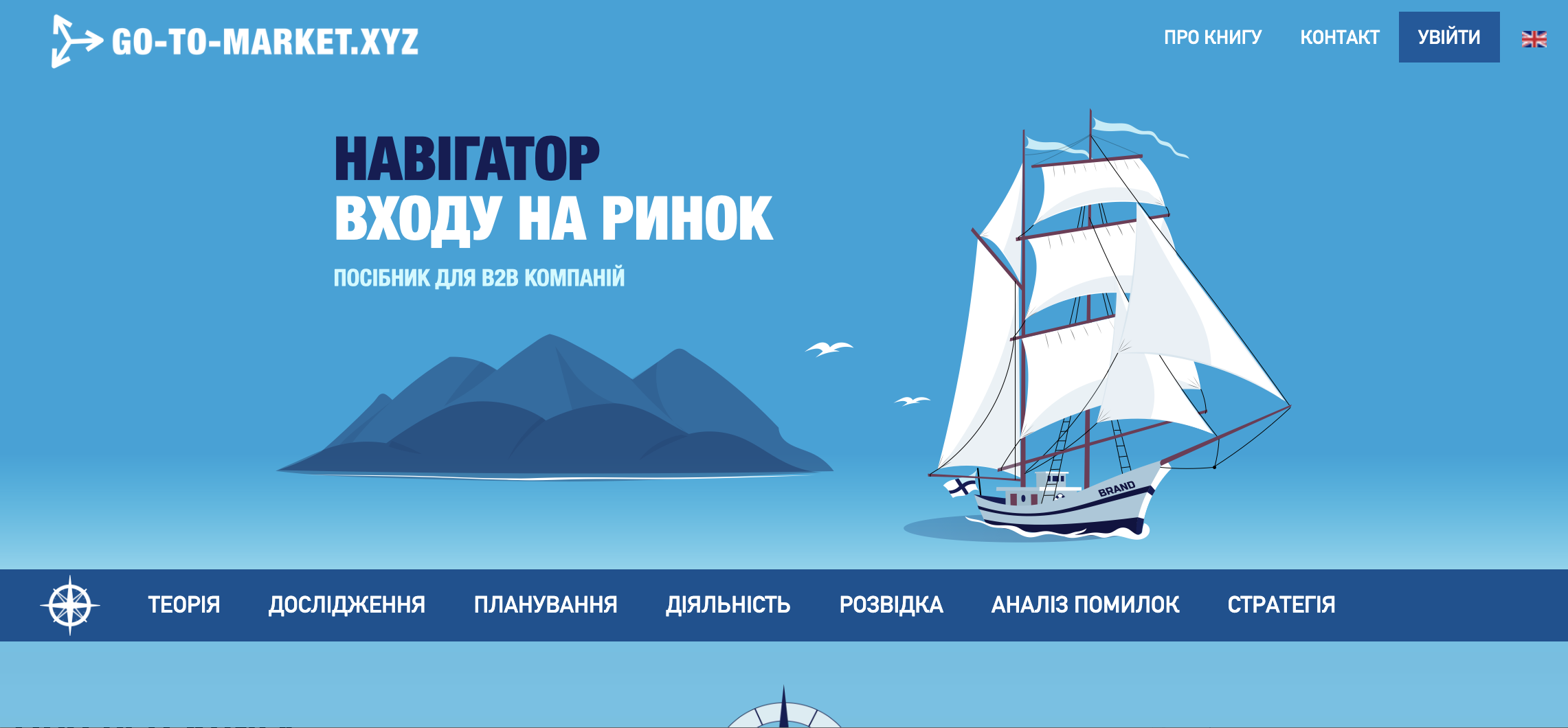
This is what the main page of the book looks like. I call it the book cover. You can get to the main page by clicking on the "go-to-market.xyz" logo in the upper left corner. On the main page, which I called the book cover, you can see the "Map of Success" below. I will tell you more about the MAP later. Let's look at the menu of other pages. Unlike the book cover, it does not have images. This is how it should be in a book. The page will be decorated with materials. The upper part of each page has two levels. The first level is blue. This is the service level. On the left, as I already said, we see the book brand, which has a link to the cover. That is, to the main page. On the top right is the service menu. The first menu item is "ABOUT THE BOOK". Judging by the fact that you have reached this page, this item does not need additional explanations. You have clearly seen this section. The second item is "CONTACT". It will also be understandable to everyone. The third is "LOGIN" to log in to your go-to-market.xyz account. If, of course, you have one. Next is the language selector. Actually, it does not translate the book into different languages. It leads to another edition of the book. In my case, to the English one. This was a service level.

The second level is blue. This is the book content level. It is the main one. At this level, there is only the main menu of the book, which you see on every page. This is not an ordinary book, but a web book, so you can’t do without a main menu. The main menu of the book has a structure of seven text items — these are parts of the book. I will explain each item of this menu later. Now we are talking about navigation.

The "Navigation sign", which you can see on the left in the first position of the main menu, leads to the TABLE OF CONTENTS of my webbook. As in any book, the table of contents should be in front. This will be the complete table of contents of the book available to you. This book has 7 parts, 21 sections, and about one and a half hundred chapters. No standard menu will be a convenient navigator for the full version of the book. Therefore, a special menu will be at your service, which is very similar to a book table of contents (ToC). The higher the access level, the more chapters of the book you will see and the more you can immerse yourself in the topic. You can also see the same white "Navigation sign" at the end of each page. When you reach the end of a chapter and decide that you need to read not sequentially, but move on to another chapter, you can do so. Go to the TABLE OF CONTENTS by clicking on the "Navigation sign". No need to go up. In addition, in different places in the book, you can see a similar sign. Only it's in color and a little bigger. Wherever you click on the navigation icon, even here, you'll go to the TABLE OF CONTENTS of the book. It will be as detailed as your access rights allow you to see.


In the image you can see an example of the full table of contents of the book for a registered reader. All chapters are available. If you are not registered or registered but not logged in to your account, you will only see guest content and a warning at the bottom. In addition, each part of the book has an internal menu that is located on the left when reading chapters on a monitor or tablet. Unfortunately, you do not see it on a smartphone. I do not recommend reading a book on a smartphone at all. It is better to watch a video or listen to a book on it. Such opportunities are available in each part of the book. But if you read on a large screen, the side menu is present, and this helps a lot in navigating sections and chapters. Therefore, you do not have to go to the CONTENTS page every time you need to move between the chapters of the part. This is how it looks. By the way, you can now see the side menu on this page. The background here is slightly different, because the page refers to auxiliary pages, and not to the main table of contents of the book, the pages of which are traditionally white. I did this for ease of reading.
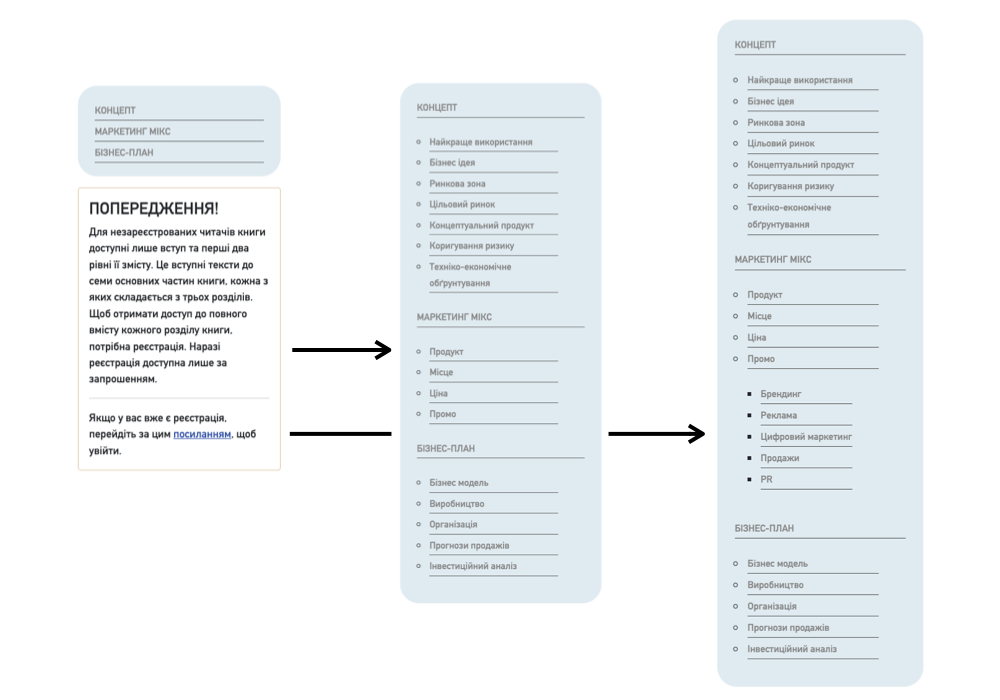
The image shows the menu of the planning section. It changes at each level of the book. At the guest level, you can see a warning about limited access to the book's chapters.
At the bottom of the page, you can see a few more navigation elements. Here's what they look like. You can see buttons to go to the next or previous topic. This will allow you to read the web book just like a regular book. From the very beginning to the end. But, of course, only those chapters that are available to you. Also look at the so-called "breadcrumbs". They will only be on the book's chapter pages.

This is another navigation tool. It is very convenient not only to see what was behind and what is ahead, but also the place in the book where you are now. You should not climb uphill for this. You could interrupt reading. Time passes, and you may no longer remember the name of the chapter where you stopped. Even lower, inside - "Navigation sign". If you wish, it will take you to the "CONTENT".